

[vc_row][vc_column width=”1/1″][vc_column_text]
With Harvest You’ll be Able To:
-
Understand where all of your time is being spent.
-
Make strategic decisions about what tasks you can eliminate, automate, and delegate.
-
Gain insight into your true effective hourly rate for every project.
[/vc_column_text][/vc_column][/vc_row][vc_row][vc_column width=”1/1″][vc_column_text]
After recommending and using Harvest with a client for the past six months, I recently converted my own timing system for Creativelutions clients to Harvest. I absolutely love it.
Harvest is a web-based time tracking app that allows you to track your time for all of your various projects. The features of Harvest include time sheets for individual staff members, rate cards that can vary from project to project, filterable reports, invoicing, and a ton more that I frankly could keep talking about if you’d let me, but let’s instead dive into why Harvest is so important to helping you increase productivity and improve your business.
I believe that any company operating within an hourly business model needs to have a simple yet powerful system in place for tracking their time. Harvest is exactly that.
“Any company operating within an hourly business model needs to have a simple yet powerful system in place for tracking their time.”
If you are not accurately tracking the time spent on each of your projects, how can you ever be sure that you are charging an appropriate amount for your work? You of course should know what your Dream Hourly Rate is, but if you don’t also track the actual time you spend completing projects, you’ll never be able to know what your true effective hourly rate is. For example, you may think that you’re receiving about $50 for every hour that you work, but when you start to track the time and review the reports, you’ll see that you are actually receiving closer to $35 per hour – not because you receive any less revenue, but instead because you are executing more hours on projects than you assumed you were.
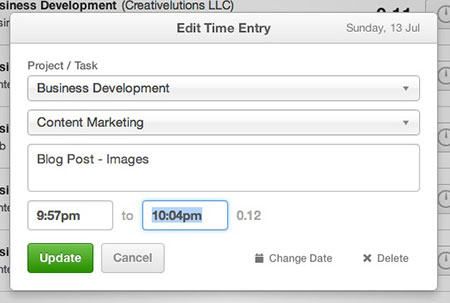
I personally track every aspect of my business using timers in Harvest, including time spent on projects, time spent researching new business tools, time spent processing invoices, and everything else that it takes to keep Creativelutions running smoothly. And yes, as I type this I’m even running a timer in Harvest under a Harvest Project called “Business Development” using a Harvest Task called “Content Marketing” with a note called “Blog Post – Writing”.

Even companies that do not follow an hourly business model can benefit from tracking their time efficiently, because incredible insights can be gained from knowing exactly where your hours are going every day.
Insights Gained from Tracking Your Time
- Understand the Time Spent on New Business – How much time are you spending winning each of your new projects? Does the compensation you’ll receive for the project justify the amount of hours you spent securing the job? Having the ability to analyze this information will empower you to make strategic decisions about how much time to spend on a proposal for each level or project.
- Conduct an Eliminate, Automate, Delegate, Do (EADD) Analysis – By tracking the time you spend working both in and on your business, you’ll be able to review the data that is produced and identify tasks that you can eliminate, tasks that you can automate, and tasks that you can delegate. What’s left is the stuff that you should do, which is likely to be the most rewarding tasks that you perform.By tracking your time, not only will you be able to see the types of tasks that you can do differently, but you’ll also be able to see exactly how much time you can free up every day if you adjust your system correctly. For example, your time report may show that you collectively spend 3 hours per day replying to email, and that time is broken up into small sections of a few minutes sporadically throughout the day. If you were to instead adjust your schedule to allow for a concentrated 1.5 hours to reply to email in bulk, you may be able to complete the same amount of work in half the amount of time, in the process freeing up 1.5 hours for other tasks. Boom! You’ve just become more efficient and taken steps to increase productivity.
Now that you understand how powerful tracking your time can be for your efficiency, productivity, and profitability, let’s dive a little deeper into Harvest. There are things I love about the app, and a few things I wish Harvest did or did better. I’ll cover both.
Things I Love About Harvest
- Reports – The Harvest reports are great because they are highly detailed and very customizable. You are able to run a report as a combination of various filters, such as date range, client, project, and team member. When viewing the results of a report, you can also quickly shift between results grouped by client, by project, and by team member. All of this is so important, because different stakeholders in your projects are going to be interested in different data and insight. With Harvest, you’ll be able to impress them all with data geared to their specific needs.
- Mobile App – The Harvest Time & Expense Tracker mobile app is simple. It allows you to start and stop timers attached to your various clients and projects. The mobile app also syncs incredibly quickly and well with the Harvest web app. When I start a timer from the web app, within seconds it appears as running within the mobile app on my iPhone as well. This is great for jumping between multiple clients, projects, and timers within one long team meeting. You can also enter expenses within the mobile app, however I’ll admit that I have not yet explored this feature.
- Rate Cards and Timesheets – Every entrepreneur and small business that follows an hourly business model has a standard rate card. If you don’t, you should develop one. Your rate card defines what your hourly rate is for each various service that you offer. You may have the same hourly rate regardless of the task you are performing, or you may have a range of hourly rates spanning several different tasks. For example, you may charge $50 per hour for graphic design and $75 per hour for digital media strategy.With Harvest, you’ll be able to define your hourly rates per task category, but what I really love is that you also have the ability to adjust those hourly rates within each project. So, for instance, if in your negotiations with a new client you agree to a reduced hourly rate, you can enter those discounted rates into the projects for that client. You’ll run your timers as you normally would, and Harvest will automatically adjust the financial compensation to align with the proper hourly rates. It’s a wonderful thing.
- Simple Editing of Timers – Inevitably you’re going to let a timer run too long, forget to turn a timer on, or incorrectly categorize a task category when starting a timer. Thankfully, Harvest makes it incredibly easy to adjust timers. All you’ll have to do is review your Timesheet, click on the edit button next to the timer you want to adjust and then make the proper changes. What’s even cooler is that if you leave a timer running for a substantial amount of time, such as overnight, Harvest will automatically send you a friendly little reminder suggesting that you may have forgotten to stop the timer. It’s like a wake-up call from the hotel front desk, but requires no setup and is much more reliable.
Things I Wish Harvest Did
- Filter Reports by Timer Notes – Each Harvest timer that you run has a field for notes. This is where you can enter further details beyond simply what category of task the timer is for. For example, the task category may be “Financial Services” and the note may be “Issue Monthly Invoices” or “Process Expense Forms”. While it’s great that the Harvest reports will show you exactly how much time you spent on “Financial Services”, the reports won’t tell you how much time you spent issuing monthly invoices vs. processing expense forms. I’d love to have that functionality.The work-around that I have been using to achieve this is to follow very consistent note entries. I always use the same exact phrase for the various notes that I enter. Then, I run the Harvest report that I want and export the results as a CSV file. Next, I open that CSV file in Microsoft Excel, which will have a column of cells showing all of the notes that I entered. I sort that column alphabetically, and because I followed a uniform system for note entry, all of the timers with the same note (invoices vs. expense forms) line up together, and I’m able to run a quick formula to add up the time for each specific task. Yes, this is several additional steps that I would rather not have to go through, but until Harvest includes a filter that allows you to filter reports by note entry, I’ll keep using this work-around to gain the further insight when needed.
- Reports on the Mobile App – As I previously mentioned, I love the Harvest reports, and I love the mobile app. One of my favorite reports is simply to see how much revenue I completed the prior week from hourly projects. It helps motivate me, and inspires me to buy an extra Lego set for my daughters after I’ve had a highly billable week. The sad thing is that the Harvest mobile app provides none of these reports or insights. It’s simply an extension of the timers and expenses. No reports.
- Ability to Prorate Hours for Monthly Retainer Projects – The Harvest system works near perfectly for projects that are billed by the hour, but it begins to fall down when it comes to fee-based projects or monthly retainer clients. The part that falls down, in my opinion, is the reporting of billable amounts and uninvoiced amounts. I’d love to be able to see that if I’m working on a project with a budget of $1,000 at $25 per hour (40 hours in the budget) and have completed 10 hours, that my billable amount for that week is $250. Instead, projects of this type in Harvest need to be designated as “not billed hourly” and the monetary information is not available for that project.This is frustrating when I run a report to see what my billable amount was for the previous week, and it appears low because the majority of work was on fee-based projects that are not included in the monetary total for the week. It leads me to believe that I can’t buy my daughters the aforementioned Legos, but then I realize that my fee-based projects aren’t included in the report, meaning I can in fact afford that extra set of Legos.
The bottom line is that I love Harvest because of how simple it is to use, and how powerful it is to gain insight from. Even without the things that I wish Harvest could do, it is still the closest thing I have come across so far to the perfect time tracking app that exactly fits the needs of me and my clients.
As with all of the tools and resources that I currently use, I hope that the developers continue to evolve the product. While researching this article, I noticed that Harvest will soon be releasing a forecasting feature to help plan your team’s schedule. I’m excited that Harvest continue to evolve. Go Harvest, go!
[/vc_column_text][/vc_column][/vc_row]